Automatically send invoices to your accountant
Does your accounting use an email inbox to receive invoices? In Onlinefact, you can easily set this up. Invoices are then sent daily at 23:00 in bulk to the email address of your accountant or accounting software. This keeps everything clear and up to date.
You can set this up via 'Settings' > 'Configuration' > 'Accounting'.
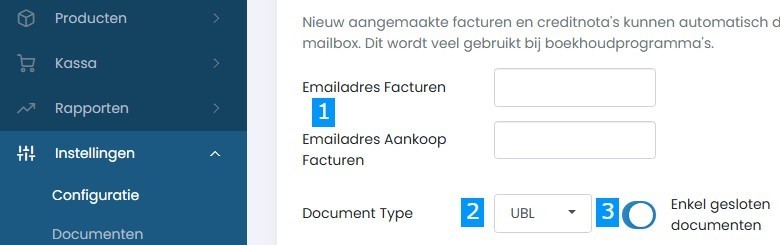
- Choose the invoice type
You can set different email addresses for sales invoices and purchase invoices. Handy if your accountant processes them separately. - Select the format
Send your invoices as PDF or choose UBL – the standard format many accounting packages can read automatically. - Decide which documents to send
You can choose to send only closed documents (for example, paid or sent invoices), so your accounting only receives final versions. - Don’t forget to save
Click Save at the bottom to activate your settings.